Bloodweb International Fees and Coupons Pro
Charge US duty only on what’s dutiable.
For WooCommerce stores that pass import duty on to overseas customers and sell a mix of products, where only some of them attract it.
Add-on for the free Bloodweb International Fees and Coupons
US duty now depends on what’s in the parcel
Australian senders have prepaid US import duty since the US suspended its de minimis exemption in 2025. Since 24 July 2026 that duty is worked out per item, from each item’s HS code and country of origin. So what a parcel owes depends on what’s in it, not just where it’s going.
The free plugin charges a region: every order to the US pays the same percentage of the whole cart. If only some of your range attracts duty, or different products carry different rates, that overcharges some customers and undercharges others. Pro lets each fee charge only the products or categories it belongs to, and you can add one fee per rate.
Source: Australia Post, US tariff changes.
🧮 Not sure what US duty is costing you? The US duty calculator shows what prepaying it costs your store each month.
See it in WooCommerce
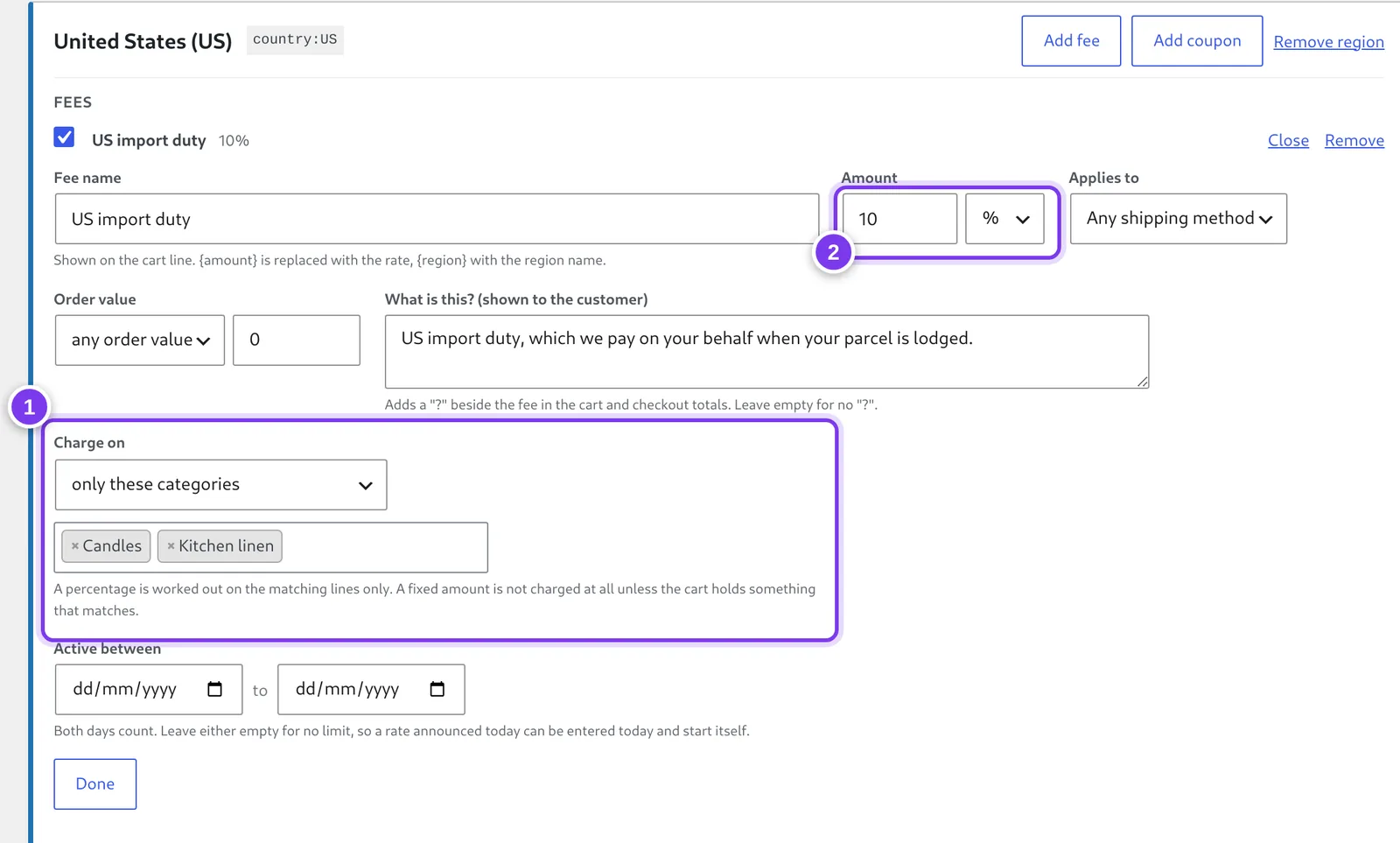
- Charge on: the whole order, only these products, or only these categories. Here candles and kitchen linen carry the duty, and gift cards and everything else don’t.
- A percentage is worked out on the matching lines only: 10% of the candles, not 10% of the whole cart. A fixed amount is charged only when the cart holds something that matches.
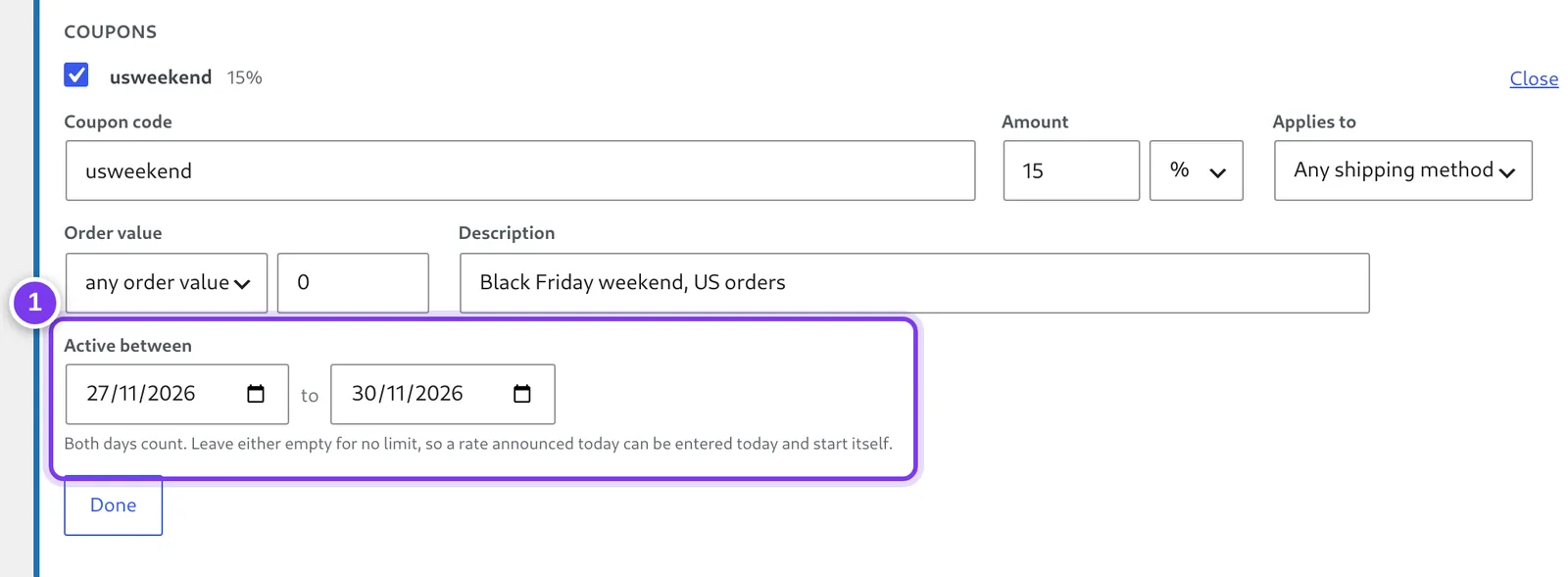
- Every fee and coupon code takes a first and last day. Both days count, in your store’s timezone, so a new rate can be entered the day it’s announced and start itself on the right morning.
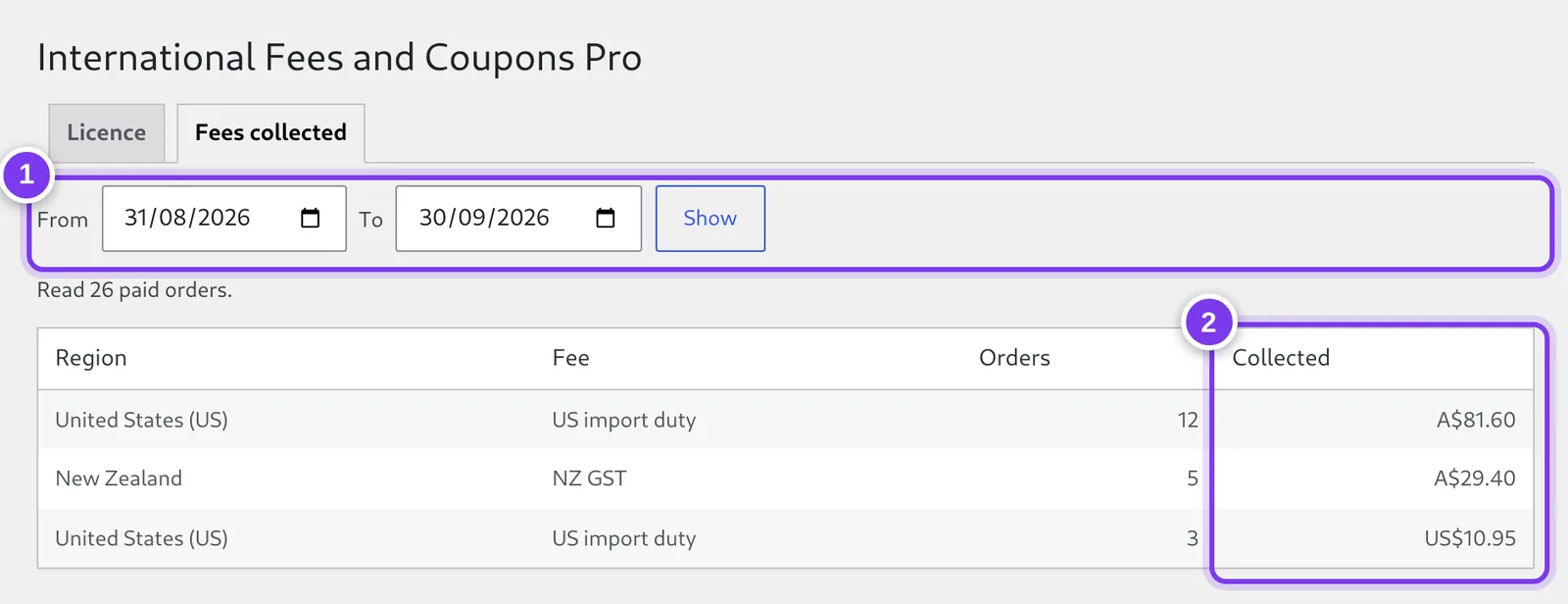
- Pick any date range.
- Totals by region and fee from Processing and Completed orders, in the currency each order was paid in.
Screens from a test store. The products, orders, customers and rates are invented. Click or tap a screen to see it full size.
What Pro adds
- 📦 Charge only what is dutiable: A fee can apply to the whole order, to named products, or to whole product categories. A percentage is worked out on the matching lines only, so 5% on furniture is 5% of the furniture and not 5% of an order that merely contains some. A product named in a rule covers its variations too.
- 🔒 Fixed amounts stay honest: A flat charge scoped to a category is not charged at all unless the cart actually holds something from it, so it never lands on an order it has nothing to do with. Shipping is never included in a scoped fee.
- 📅 Enter a rate change before it happens: Every fee and coupon code takes a first and last day, both inclusive. A rate announced three weeks out can be entered the day it is announced and start itself on the right morning. Dates are read in your store’s timezone, so a rule ending on the 30th charges all the way through the 30th where the shop is.
- 📊 See what was collected: A report shows what each region charged over any date range, broken down by fee and counted in the currency the order was paid in. Fees are attributed when the order is made, so the figures survive a rule being edited or deleted later.
- ⚙ In the same place as everything else: The Pro fields appear on the free plugin’s own rules screen, so a rule is edited in one place. Works with the Checkout block and WooCommerce’s High-Performance Order Storage.
- 🔄 Updates from your dashboard: New versions arrive through the normal WordPress Updates screen while the licence is active.
What happens after you buy
- Pay. Checkout is by Stripe. There’s no account to create, and prices are in Australian dollars.
- Get your key. It’s shown on screen straight away and emailed to you. It starts with
IFCP-. - Download. Use the download link on that page, or come back here any time and download with your key.
- Install. Plugins → Add Plugin → Upload Plugin, then activate it. The free Bloodweb International Fees and Coupons (4.4.0 or later) needs to be active too.
- Paste the key under WooCommerce → Fees and Coupons Pro and press Activate. Done: Charge on and Active between appear on every rule under WooCommerce → Fees and Coupons.
The setup guide walks through each step and the three settings that matter. It takes about ten minutes.
🔑 How licensing works
Pro is a subscription that renews automatically at the end of each month or year, depending on the plan you choose. A licence covers one live site, or up to 5 with the agency licence. Local development sites (localhost, .local, .test) are free and never use up the licence. Moving to a new address? Deactivate the key on the old site and activate it on the new one.
If you cancel, Pro keeps working until the end of the month or year you’ve paid for, then switches off. The free plugin keeps working either way, and the scopes and dates stay on your rules, so renewing switches them straight back on.
14-day money-back guarantee. If Pro isn’t right for your store, email support@bloodweb.net within 14 days of buying and you get a full refund. The licence is switched off when the refund goes through.
Requirements
- Bloodweb International Fees and Coupons 4.4.0 or later, installed and active
- WooCommerce 3.0 or later, WordPress 5.8 or later, PHP 7.4 or later