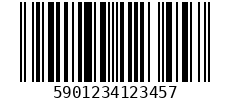
Make product and shipping barcodes: EAN-13, EAN-8, UPC-A, UPC-E, Code 128, Code 39, Code 93, ITF-14 and Codabar, as PNG or SVG. Here is the whole call in Node.js, with the output it produced when we ran it.
Before you start
An API key. Create a free account; it comes with free tokens every month. Put the key in an environment variable so it stays out of your code: export BLOODWEB_KEY=your_key
Node.js 18 or later. Nothing to install: fetch, FormData and Blob are built in. Save the file with the .mjs ending so await works at the top level.
The code
Save it as barcode-generate.mjs and run node barcode-generate.mjs.
// Node.js 18 or later: fetch, FormData and Blob are built in.
import { writeFile } from "node:fs/promises";

const url = new URL("https://bloodweb.net/api/v1/barcode-generate");
url.search = new URLSearchParams({ type: "ean13", data: "590123412345" });

const res = await fetch(url, {
  headers: { Authorization: `Bearer ${process.env.BLOODWEB_KEY}` },
});
if (!res.ok) throw new Error(`${res.status}: ${(await res.json()).error.message}`);
await writeFile("barcode.png", Buffer.from(await res.arrayBuffer()));
What you get
Tested 19 October 2026: this exact code ran against our test copy of the API, which runs the same service code as bloodweb.net, and produced this.
It writes barcode.png: a PNG image, 230 × 106 pixels, 2 KB.
Change the call
Every option the Barcode generator takes. Add or change them the same way as the ones in the code.
datarequired: What to encode. For EAN and UPC, leave off the check digit and it is added; include it and it is verified.